

Executors
Supported on Enterprise plans.
Executors run resource-intensive or untrusted work on behalf of Sourcegraph. They are used to:
This page covers the Sourcegraph configuration and administrative tools that apply to every executor. If you operate a self-hosted Sourcegraph instance and need to deploy executor infrastructure, see Deploy executors.
Why use executors?
Running untrusted code is a core requirement of features such as precise code navigation auto-indexing and running batch changes server-side.
Auto-indexing jobs, in particular, invoke project build tools to resolve dependencies. Post-install hooks, insecure package management tools, and package manager proxy attacks can allow malicious code to consume compute resources or exfiltrate data. This is especially dangerous when the work runs inside a Sourcegraph instance that has repository data on disk and unprotected services on its internal network.
Executors move this work outside the Sourcegraph instance. A job receives an isolated workspace containing a clone of only the repository it needs, limiting its access to other repository data and Sourcegraph services.
How executors work
Executors run jobs outside the Sourcegraph instance. Each executor connects to Sourcegraph, requests work from a queue, prepares an isolated workspace containing one repository, runs the job, and sends its progress and result back to Sourcegraph.
Keeping this work outside the Sourcegraph instance limits the access that untrusted build tools, package managers, and user-defined commands have to Sourcegraph services and repository data. The exact isolation boundary depends on how the executor is deployed. Self-hosted administrators should review the deployment and isolation options before deploying executors.
Sandboxing model
Executors can run each job inside a Firecracker MicroVM to isolate the job from other jobs and the executor host. Firecracker provides the strongest supported isolation boundary and requires Linux KVM extensions. On cloud infrastructure, this generally requires a bare-metal instance on AWS or nested virtualization on Google Cloud.
Executors can also run jobs in Docker containers or as Kubernetes Jobs without KVM-based isolation. These methods are easier to deploy on common infrastructure, but they provide a weaker isolation boundary and require additional host, node, and network controls.
See Firecracker isolation for architecture and caveats, or choose a deployment method based on your infrastructure and security requirements.
Setting up executors
The following steps configure a self-hosted Sourcegraph instance to accept connections from executors. They are separate from deploying the executor service onto infrastructure such as a Linux host, cloud virtual machine, or Kubernetes cluster.
Sourcegraph Cloud includes Sourcegraph-managed executor infrastructure by default. Cloud customers using these managed executors do not need to configure executor authentication or deploy their own executor infrastructure.
If you operate a self-hosted Sourcegraph instance, complete the steps below and then follow the self-hosted deployment guide to choose a deployment method and install executors on your infrastructure.
Self-hosted executors authenticate to Sourcegraph with a shared secret:
-
Generate a random secret containing at least 20 characters. For example, use OpenSSL to generate a 64-character hexadecimal secret:
BASHopenssl rand -hex 32 -
Open Site admin > Configuration > Advanced configuration.
-
Set
executors.accessTokento the generated secret and save the site configuration.SHELL{ "executors.accessToken": "<generated-secret>" } -
Configure the same secret on each executor as
EXECUTOR_FRONTEND_PASSWORD, or through the equivalent setting for its deployment method.
The executor authentication secret is not a Sourcegraph user access token and is not managed on the Access tokens page. See Site configuration for more information about editing site configuration.
Monitor executor instances
The Executor instances page becomes available only after
executors.accessToken is configured in site configuration.
Open Site admin > Maintenance > Executor instances to see executors that have connected to Sourcegraph. The page shows whether each executor is active, its Sourcegraph compatibility, and details including its hostname and installed runtime versions.
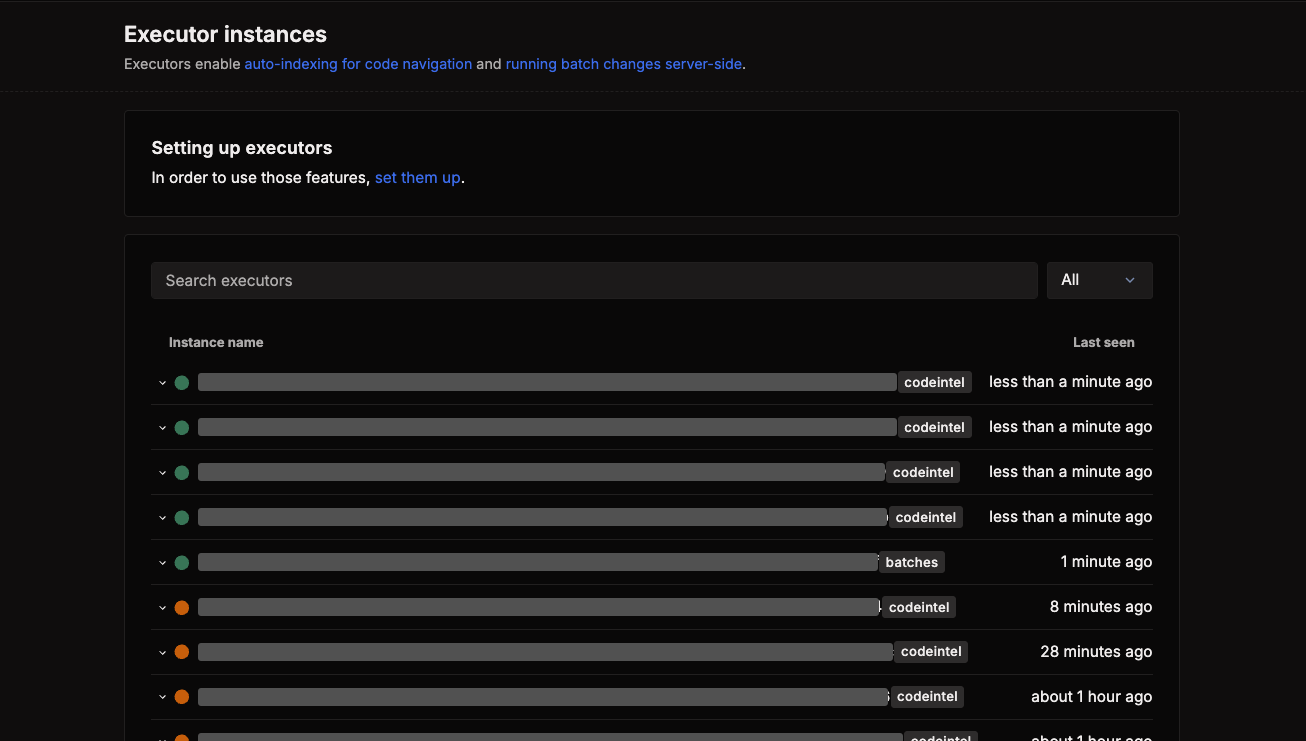
Use this page to confirm that a new or upgraded executor is connected and reporting the expected version. For host, service, or runtime failures, see Troubleshoot executors.
Manage executor secrets
Executor secrets provide environment variables to jobs without placing secret values in a batch spec. Global secrets are available to every eligible job, while user and organization secrets apply only to jobs in their respective namespaces. Namespaced secrets override global secrets with the same name.
Site administrators manage global secrets under Site admin > Batch Changes > Secrets. Users and organization administrators manage their scoped secrets from the corresponding user or organization settings.
Learn how to create, rotate, and remove executor secrets.
Deploy executors
Compare deployment methods and review infrastructure requirements for self-hosted executors.
Executor configuration reference
Review the environment variables supported by the executor service.
Troubleshoot executors
Diagnose connectivity, runtime, scheduling, and isolation issues.